

Smart paste for Windows
The form is empty.
You already have the answers.
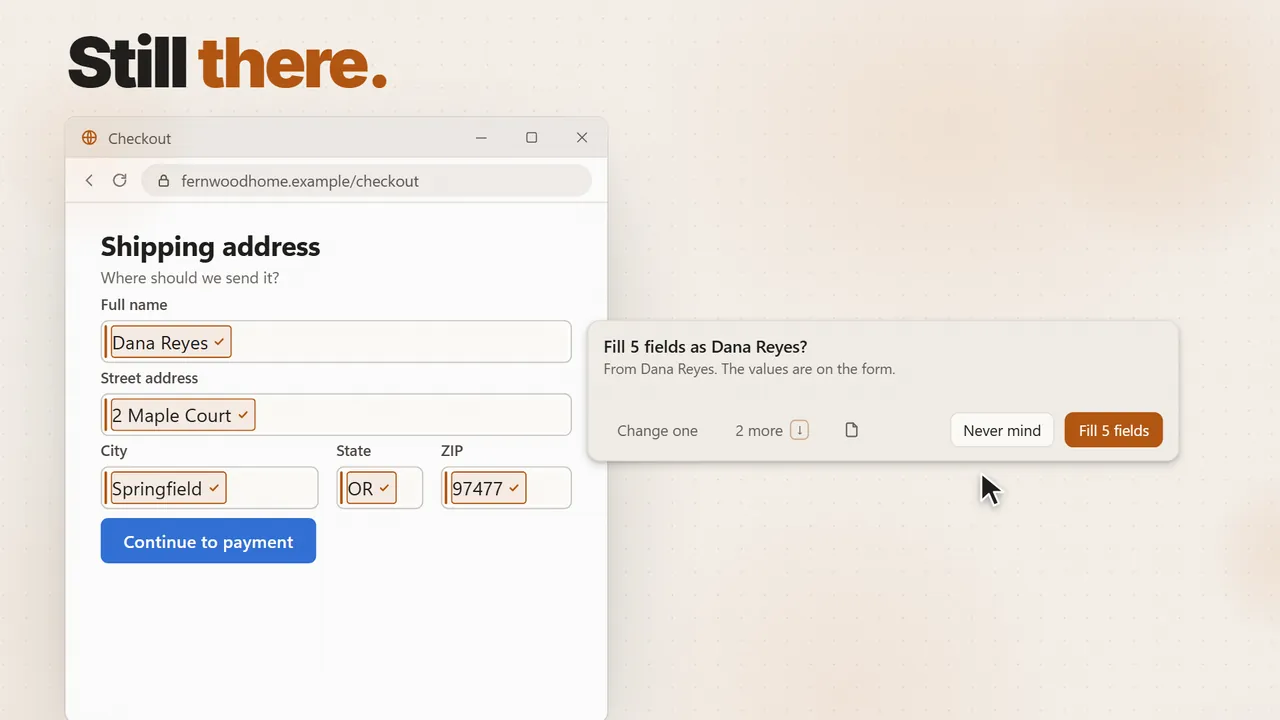
They are in the email you just copied, the PDF on your other screen, the business card on your desk. Press Alt+Shift+V and smart paste fills every box from them. You see each value first, and nothing is typed until you say so.
If Windows SmartScreen asks about this new release, click More info → Run anyway. The installer is code-signed and verified.
Tell us who we are paying.
The PO number was already filled in, so it is left alone.
Watch it (35 sec)
Smart paste is one free tool of
- Snipping Tool
- Text Extractor
- Clipboard history
- Text expander
- ChatGPT tab
Runs on your PC, not in a tab · no account · free forever
Where the answers come from
From whatever you
already have.
A signup page, a vendor form, a shipping address, a support ticket. The details are almost always somewhere on your PC already. Smart paste brings them to the form, so you stop copying one box at a time.
An email or a page you copied
Copy the whole signature, the order confirmation or the page with the details, then press the shortcut. It finds the name, the email, the phone number and the address inside it.
A picture of a form
Snip a delivery note, a business card, an invoice or a page of a PDF, then fill the web form from that. The words come out of the picture on your own PC. A screenshot you just took works too: press Ctrl+V in the form and it offers to fill from it.
Your own details, saved once
Name, address and the rest live in a card on your PC, not in a browser account, so they fill in any app on the machine. Never a password, a card number or an API key.
Several people? You choose
Copied a table with six contacts in it? Smart paste lists the people it found and fills the form with the one you pick.
It works in any app you can type in, not only the browser: desktop apps, installers, portals. A long form is filled all the way down, including the boxes you would have to scroll to, and the page is put back where you were. Land on an empty form and a small offer appears at the box, once per form, so you do not have to remember the shortcut. Turn that off in Settings if you would rather ask.
You check first
Nothing lands until
you say so.
A form that fills itself wrong is worse than an empty one. So smart paste shows its work and keeps its hands off anything you did not ask it to touch.
Every value, before it is typed
You see each box it matched and what it would put there. Turn off the ones you do not want, then fill.
It never makes a value up
Every value comes from something you really had. If nothing fits a box, the box stays empty rather than getting a guess.
What you typed stays typed
A box that already holds something is skipped. If you want it replaced, there is a switch for that in Settings.
It checks its own work
Some web forms accept a value and quietly throw it away. If a box did not keep what was written, you are told, with one click to try that box again.
Not password boxes
Smart paste never touches a password field. Keep your password manager; this is for everything it was never going to fill.
Your details, on your forms
The offer to fill in your saved details shows up on a signup or a checkout, not on an invoice you are raising for a client or a form about somebody else.
Have a TypeSafe key? Paste it in and smart paste matches the boxes with Jev, faster, and fills a box that asks for city, state and ZIP all at once. Bring your Jev key.
The honest version
Browser autofill knows your address.
It does not know the email you just copied.
Here is where smart paste sits next to what you already use.
| What you have now | Smart paste | |
|---|---|---|
| Someone else's details | Copy the name, switch windows, paste. Copy the email, switch back, paste. Twelve round trips | Copy it all once, press one shortcut |
| A paper form or a PDF | Retype it by hand | Snip it and fill from the snip |
| Where it works | Browser autofill works in the browser that saved the value | Any Windows app you can type in |
| What you approve | One saved profile, filled as a set | A preview of every value, and any box can be turned off |
| Price | Free, and it only knows what it saved | Free, forever |
The trade is real, so here it is. KeptInFlow is Windows 10 and 11 only. Matching boxes to values is a judgment call, so smart paste asks an AI model: the form's box labels and the text it is filling from go to the model you chose, with your own key or the 100 free AI actions a month. It is not a password manager and does not fill passwords or card numbers. A box it cannot place stays empty, which is deliberate: silence is better than a wrong guess in a form you are about to submit.
No subscription required
Keep it free. Or pay once for Pro.
Try everything free for 30 days. Then keep the free plan forever, or go Pro.
App forever. The first 100 buyers get every update for life; after that, a license includes 1 year of updates. Keep the last version you got if you don't renew. This is not a stealth subscription.
Free trial
30 days
- Every feature, no limits
- Smart paste, code catching and Fetch all included
- Then keep the free plan forever, or go Pro
- No card up front. Nothing to cancel.
Free
$0 forever
- Snip, grab text, scrolling capture, color picker
- Clipboard cycler, clean paste, text expansions, calculator
- Smart paste, verification codes, AutoCorrect, mouse gestures
- AI chats, rewrite, inline prompt, command palette
- Record your screen, with sound
- Dictation: 2,000 words a week
- Pair your phone and send things across
100 AI actions a month on us. Want more? Use the free on-device model, your own AI key, or the AI plan.
Pro
$59 one-time
$59 for the first 100 buyers, then $79, then $99.
- Everything in Free, plus Screen Memory, the journal, meetings and billing
- The Studio look, webcam and step-by-step recordings
- Unlimited on-device dictation, no quota to run out of
- Own it forever, no subscription
- Every future update, for life
- Form filling, capture, meetings, clipboard, dictation, expansion, and AI in one app
- 30-day refund, no questions asked
$59 is the founding price for the first 100 buyers, with lifetime updates. It ends when those seats sell out, not on a timer. The next 200 buyers pay $79, and after that the price is $99. Those two include one year of updates, renewable for $39/yr (or don't renew and keep what you have). Or get lifetime updates for $199. Every option is a single payment with the 30-day refund.
AI Included
$12 a month
AI that just works. Nothing to set up.
- 5,000 fast AI actions a month
- 1,200 minutes of cloud dictation a month
- Every Pro feature included while it runs
- No key to get and no AI account to open
- Works on its own, or on top of a Pro license
It renews automatically at that price until you cancel. Cancel anytime from Manage subscription in the app, or at app.lemonsqueezy.com/my-orders.
AI that works the moment you subscribe. Or use your own AI key, or the free on-device model.
There are three ways to run the AI. The free on-device model answers on your own PC and costs nothing to run; it is smaller and slower than a cloud model. With your own AI key you pay the AI company directly for what you use. The $12/month AI plan is for people who want AI to just work: no key and nothing to set up, one bill, 5,000 fast AI actions a month, 1,200 minutes of cloud dictation, and every Pro feature included while it is active. On-device dictation and transcription are unlimited with Pro or the AI plan.
Before you ask
Questions, answered.
Is smart paste really free?
Yes. Smart paste is on the free plan, and the free plan does not expire. It needs an AI model to match boxes: with no key, 100 AI actions a month are on us, and with your own key from OpenAI, Anthropic, Google, xAI or OpenRouter there is no cap from us. A TypeSafe key works too.
Can it type something I did not approve?
No. You see every value in the preview first, and you can turn off any box before it fills. A box that already holds text is skipped unless you switch that on. It never touches a password field.
What does it send, and where?
The form's box labels and the text it is filling from go to the AI model you chose, and nowhere else. With your own key they go straight to your provider. Reading text off a snip happens on your own PC. Your saved details live in a file on this PC, with no account to sign in to.
Does it work outside the browser?
Yes. It is a Windows feature, not a browser extension, so it works in desktop apps and installers the same as in Chrome, Edge or Firefox. The one place it cannot help is a remote desktop window, because the boxes are on another computer.
What about the one-time codes and order numbers?
Those have their own free tools: the code catcher puts a login code under the box that asks for it, and Fetch offers the order number you copied at the box that wants one. See codes and autofill.
What about macOS?
Windows first: that's where the deepest integration is possible today. macOS is on the roadmap but not dated.